Welcome to Batsocks!

We sell small, simple, circuitboards and kits.

Have a browse through our BreadMate, Shields and Other product ranges to see if you like anything. Don't forget to have a look at our Read Me section for various articles, tutorials and information pages.

If you've got any questions, please contact us!

News:

posted:2010-10-03
Product Update: New TellyMate Firmware release : 1.1.00

A new firmware revision for the TellyMate has been released (1.1.00).

Summary of changes in v1.1.00:

  • 64 RAM-based font characters (e.g. user defineable whilst running) (M328p only)
  • Read fontbank character definitions
  • Software control of PAL/NTSC
  • More accurate SYNC pulses

As usual, the documentation for this new functionality can be found in the TellyMate User Guide.

An Arduino sketch that displays large characters on the TV (reading the definitions from the TellyMate) is also available.

[Aside] I've recently found that some televisions with component inputs (YPrPb) will happily show the TellyMate's (composite) output when it's connected to the Y input. I'd appreciate any feedback on this - I've had luck on all 4 TVs I've tried this with (2 samsungs and 2 Sonys).

posted:2009-09-05
Product Update: TellyMate Fonts

A new firmware revision for the TellyMate has been released (1.0.14). It allows the character set (fontbank) to be re-programmed through control sequences. You can now design your own fonts!

An example Arduino sketch has been written to upload font data to the TellyMate Shield and a (google documents) font design spreadsheet has been put together to help you design the characters.

If you've built your own TellyMate around a M168 or M328p processor, you can even define multiple fontbanks. Each row on the screen can be set to use a particular fontbank. An M168 will allow 4 fontbanks (0-3) and an M328p allows 11 fontbanks (0-10).

More details can be found in the new 'Fontbanks' section of the User Guide.

posted:2009-06-10
New Product: 6 Button Shield

This elegant curved shield provides 6 tactile buttons. For more information, see the 6 Button Shield page.

posted:2009-06-10
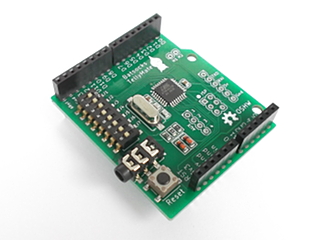
Product Update: TellyMate Shield

New features:

  • The TellyMate Shield can now return data back to the Arduino (see the User Guide for details)
  • Professionally made PCB
  • Straight-through 'stacking' headers - The new board is no longer 'offset'

For more details, see the TellyMate Shield page.

posted:2009-03-04
Trial: Worldwide shipping

We're trying out international shipping.

Those of you not in the UK can now also buy stuff from Batsocks!

Because this is our first toe in international waters, we're keeping P&P at the same reasonable rates as for UK orders. Hopefully Royal Mail will do us proud.

posted:2009-02-07
New Project: TellyMate - A Serial to TV adapter

We've designed a handy project that takes serial data and displays it on a TV.

The TellyMate project itself can be found in our 'Other' section, and an article that takes detailed look at the design can be found in our 'Read Me' section.

This simple circuit uses a Mega8/Mega88 to output PAL or NTSC composite video signals.

  • 38x25 characters.
  • Up to 57k6 baud.
  • Optional Autobauding (perfect for listening to μcs with uncalibrated clocks).
  • VT52 and H19 control codes.
  • Double-width and double-height characters.
  • Code page 437 characters.

We'll be using ours for 'debug output' using the 'Picture-in-picture' of the computer monitor. Alas, it's not quite suitable for all our schematic needs.

[edit: 25/2/2009 - The TellyMate can now output NTSC]

[edit: 11/3/2009 - The TellyMate can now use a Mega88]